

How to define the visibility of a trip?
The visibility of a trip allows you to choose who can view it.
You can set the visibility when creating the trip or modify it later from your list of trips.
The visibility levels
A trip can have three levels of visibility:
- Public : the trip can be publicly visible.
- Shared : the trip can be viewed by people with the link.
- Private : the trip is visible only to you.
Change the visibility of a trip
1
Open your travel list.
➡️ See also: How to view your trip list?
2
Locate the trip you wish to modify the visibility of.
3
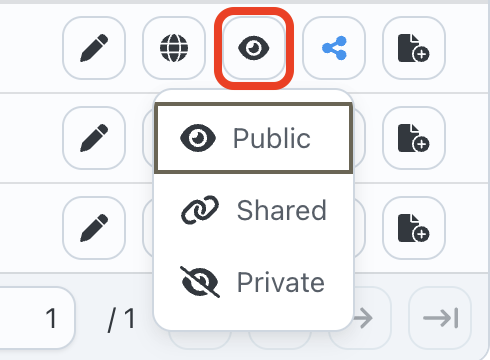
Click on the visibility action associated with this trip.
4
Select the desired visibility: Public, Shared or Private.
5
The new visibility applies to travel.
Which visibility to choose?
- Choose Private if you do not wish to share your trip.
- Choose Shared if you want to send the trip to certain people using a link.
- Choose Public if you want the trip to be more widely visible.
➡️ See also: How to share a trip?